How to get started with digital accessibility
Experts at TTaDA give feedback on starting the journey to ADA Title II compliance, plus common misconceptions

Editor’s note: In the UND LEADS Strategic Plan, the Equity core value calls on the University to “work to meet the changing needs of our students and employees with a commitment to access and inclusion.” This story reports on the University’s ongoing effort to become a national leader in the area of digital accessibility.
This story originally appeared in UND Today on Oct. 9.
####
UND is moving forward with its campuswide plans for becoming compliant with new Title II accessibility requirements for the Americans with Disabilities Act.
As Provost Eric Link remarked recently in an interview with UND Today: “This work isn’t for the few, it’s for all of us.”
One of the efforts on campus is the Strive for 85 initiative, which encourages content creators in Blackboard Ultra to achieve an 85% or higher Blackboard Ally score.
The Strive for 85 initiative is designed to ensure that all students, regardless of ability, can fully engage with course materials, as well as with the University’s digital resources.
But how do content creators get started on the journey of attaining an 85% or higher score in courses starting in spring 2026?
As accessibility becomes a proactive, campuswide priority — paired with the transition of courses to the Blackboard Ultra platform — the Teaching Transformation & Development Academy’s expertise has been at the fore.
The TTaDA team has long promoted digital accessibility best practices in its workshops, book reads and committees. These efforts now serve as a foundation for the questions the team is currently fielding from faculty.
UND Today reached out to learn what the team is advising, as well as the misconceptions that are out there surrounding digital accessibility.
Editor’s note: The following was developed based on written responses by TTaDA to several questions on the topic.
Points of action
Kristi Embry, an instructional designer in TTaDA, frequently begins accessibility workshops and sessions with several analogies, such as: “Accessibility is like chocolate chip cookies: the chips are best baked in.”
Like cookies, the best time to make course content accessible is before it goes into a Blackboard course. Trying to jam the chocolate chips into already-baked cookies doesn’t make for an optimal cookie experience.
In other words, making course resources accessible after they go into the course puts unnecessary pressure on instructors and can frustrate students who have to wait for content to be fixed. Proactivity is key.
TTaDA’s team encourages everyone to prioritize accessibility — to plan ahead and build in time to learn more about accessibility issues and how to fix digital content.
For those just getting started, look to these four points of action:
- Explore UND’s accessibility resources: Review TTaDA’s Digital Accessibility webpage, attend workshops and use Deque University’s training modules. These resources provide a foundation of knowledge and tools.
- Use Blackboard Ally: Blackboard Ultra includes Blackboard Ally, an accessibility checker that flags common issues in course files and offers guidance for remediation. Think of Ally as a starting point rather than a complete solution.
- Work incrementally: Treat accessibility as a long-term project. Fix one issue in one document, step away, and return later to address another. Consistent, small improvements add up over time.
- Focus on the course resources you can create and control: While instructors may not be able to do anything about textbook resources, especially if they come from a third-party vendor, they can focus on resources such as Word documents, PowerPoint documents and video content.
Low-hanging fruit
When asked what kinds of “low-hanging fruit” can make a big difference, the team listed syllabi, PowerPoint presentations, video content, and text readability.
With syllabi serving as the contracts between instructors and students, they should be 100% accessible when a course opens for Preview Week. Microsoft products provide an accessibility checker, or instructors can opt to use Simple Syllabus.
PowerPoint is often used to study, prepare group work and present research and experiences. TTaDA’s page on PowerPoint can show how to create and hide (if necessary) accessible headings, tables, lists, color, and images.
WCAG 2.1 AA — the web content standard required by Title II — dictates that all pre-recorded video content must have accurate captions and audio description. It is a best practice to accompany accessible video with transcripts, as transcripts are the only way deaf-blind individuals can access video content.
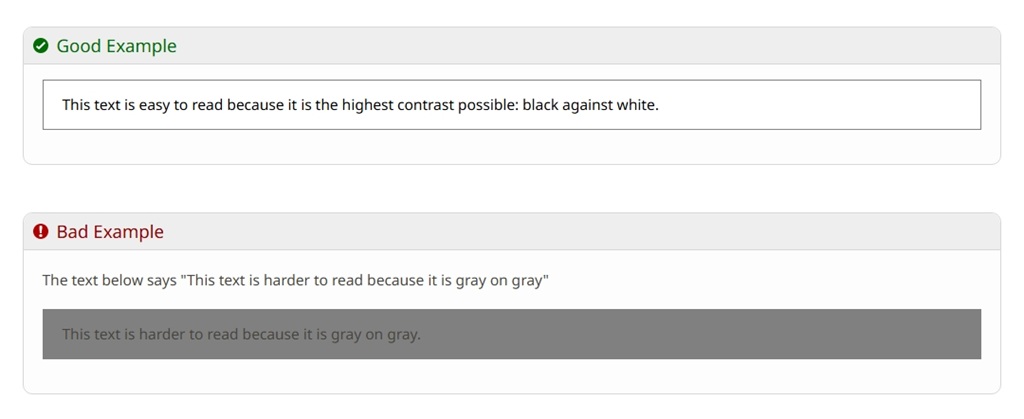
For all documents, text needs to be readable and easily viewed. Making small edits such as ensuring text is 12 points or higher in Word and at least 20 points in PowerPoint, as well as making paragraph spacing 1.5 or higher, can really impact how students retain and navigate information.
To assess the accessibility of existing materials, TTaDA’s team recommends using accessibility checkers available in Blackboard Ultra, Adobe and Microsoft products, as well as through referencing resources such as Deque University and TTaDA’s accessibility website.
Common misconceptions
UND Today asked the TTaDA team for some of the most common misconceptions that are out there about digital accessibility:
- “Accessibility limits my creativity”
Accessibility does not restrict your use of color, images or design. It simply requires that these elements be used in ways that everyone can access. In fact, many accessibility practices align with good design principles. - “TTaDA will fix accessibility issues for me”
TTaDA provides resources, training and tools for faculty to use in making their course materials accessible. With the large volume of courses each semester, TTaDA is unable to fix accessibility issues for faculty. - “PDFs are not allowed in Blackboard Ultra”
PDFs may be used, but they must be remediated for accessibility. In many cases, using the original Word or PowerPoint file is a simpler option. - “I should remove inaccessible content altogether”
Deleting images, slides or documents may harm student success. Instead, faculty should remediate and improve content rather than remove it unnecessarily. - “Accessibility is a one-time fix”
Accessibility is an ongoing process. Standards evolve, student needs shift and course content changes. Review materials regularly, ideally each semester. - “Accessibility only helps students with disabilities”
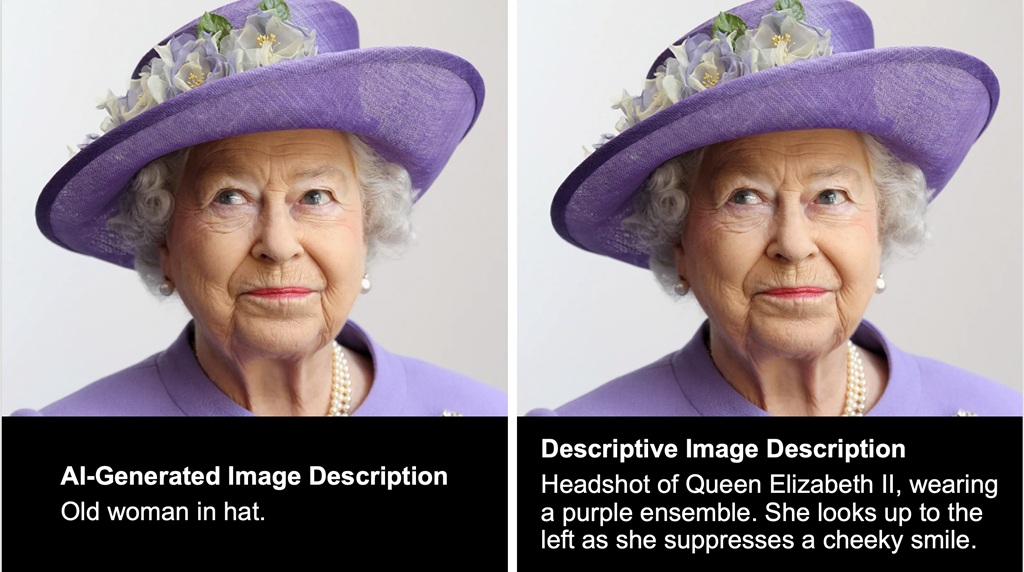
In reality, accessibility benefits all learners. Captions help in noisy environments, high-contrast text supports students with eye strain and image descriptions assist those with slow internet connections.
Start running the race
The team acknowledges the heavy lift of making content accessible and meeting Title II compliance but emphasized the benefits to all learners, as expressed in the last bullet point.
“Accessibility does benefit folks with disabilities, no question about it,” they wrote. “The perception, however, is that there are very few people with disabilities. This assumes that all disabilities are visible or that other groups of learners can’t benefit from accessible resources, which is not the case.”
Another analogy that the TTaDA team often uses when talking about accessibility is a race. As they frequently point out, making digital content accessible is a marathon, not a sprint.
Part of “running the race” is thinking of accessibility as a teaching value, rather than an add-on. Building inclusive design, sharing strategies and making accessibility part of course development are keys to success.
TTaDA’s most prudent advice is to “start running the race,” or, going back to the cookie analogy, “start learning the recipe.”
By taking small steps now, faculty can create courses that are more effective and fully aligned with Title II requirements. Their central role in this effort, embracing accessibility, helps create a campus where equity and excellence go hand in hand.
Editor’s note: Live workshops and information sessions on digital accessibility topics are hosted monthly by TTaDA and open to all UND employees. Visit the upcoming events page to browse the full list of sessions.
####
>> Questions or comments about the UND LEADS Strategic Plan? Your thoughts are welcome! Please contact Ryan Zerr, associate vice president for Strategy & Implementation, or Anna Marie Kinney, coordinator of the University Writing Program, the co-chairs of the UND LEADS Implementation Committee. You also may offer your thoughts by visiting the UND LEADS Strategic Plan home page and clicking on the “Provide your feedback” link.
Thank you for your support of the UND LEADS Strategic Plan!