New checkout validation functionality in UND Marketplace
There is a new functionality added within UND Marketplace (Jaggaer) which will check shopping carts for common errors or data validation issues prior to the Requester placing the requisition. This functionality is known as Checkout Validation. By introducing more checks on the shopping cart, P&PS hopes to reduce the number of automated returns, Comments, and ‘send backs’ that can be solved by correcting the shopping cart earlier in the requisitioning process.
The checkout validation rules produce two types of results: a Warning, or an Error. Please contact Procurement & Payment Services (via email to und.pps@und.edu, or chat with us on Teams via the link in UND Marketplace) with any questions or concerns if you encounter this new functionality when placing orders. Examples of the new functionality are below.
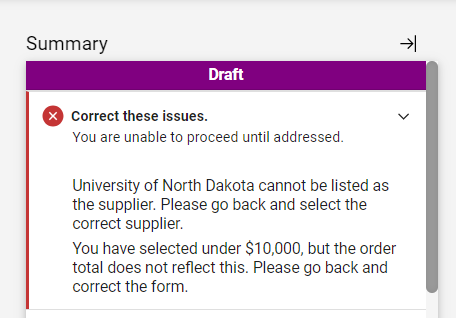
Error messages mean that the user cannot place the requisition until the errors are fixed. The cart will display messages letting the end user know what needs to be corrected to fix the indicated error. Examples of Error messages (indicated with the red circle/white cross symbol) are below:
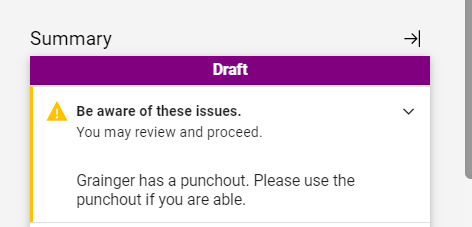
Warning messages (indicated by the yellow triangle symbol) are intended to alert the user that they may not be taking the best course of action or that data may be missing, but the user can choose to continue on and place the requisition:
Thank you,
Procurement & Payment Services