Registrar’s Office and Student Finance forms moved to eForms tile on Campus Connection
Several campus forms previously found on the Registrar’s Office and Student Finance websites are now located under the “UND eForms” tile in Campus Connection.
Other forms, including Enrollment Verification and Undergraduate Request for Readmission, are also available by clicking on the “Campus Connection Guest Login” page.
Students should be encouraged to log into Campus Connection and click on the eForms tile to complete the respective form. Their academic advisor can assist with filling out the form, if needed.
Students will be prompted to list their instructor, using the instructor’s email from the UND Directory, while completing the Registration Action form for the following actions: add after the deadline, department consent, elect audit grading, override full capacity, override pre-requisites missing, section change and time conflict.
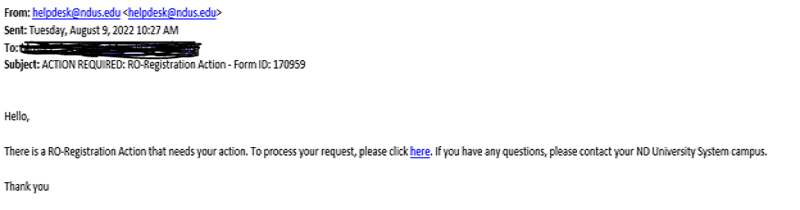
The instructor will receive an email from helpdesk@ndus.edu with the subject line, “ACTION REQUIRED: RO-Registration Action – Form ID (number)” with a link to evaluate the form in the Campus Connection eForms tile. See the screenshot below for a sample.
Instructors can also search any pending forms for approval/disapproval by logging into Campus Connection > UND eForms tile > Evaluate, found with left navigation > Form Type, click the magnifying glass and selected Registration Action form > Search.
If you have any questions regarding the Registrar’s Office forms, please feel free to contact the office at 701.777.2712 or und.registrar@und.edu.