New Pay Confirm Report
NDUS Core Technology Services has developed a new report to assist users in reviewing how earnings funding will be distributed prior to pay confirm.
The HE CA Funding Source report should be run during an open pay cycle (after paysheet creation but prior to confirm), as it predicts what funding will look like prior to confirm. Access to this report is limited to employees assigned HCM access as departmental support staff and those assigned the “Commitment Accounting” role. View a full list of HCM roles and definitions at UND.edu/HR.
Running the Report
Navigate in Manager Self-Service by selecting the navigation icon on the top right corner. Select ND HE Apps, then Commitment Accounting then HE CA Funding Source Report.
The page will reload. If it’s your first time running the report, you’ll need to select “+Add a New Value” in the top right corner of the page.
- Create a run control ID
- ex. HECAFunding_CEME
- The page will reload to allow input parameters
- * indicates a required field
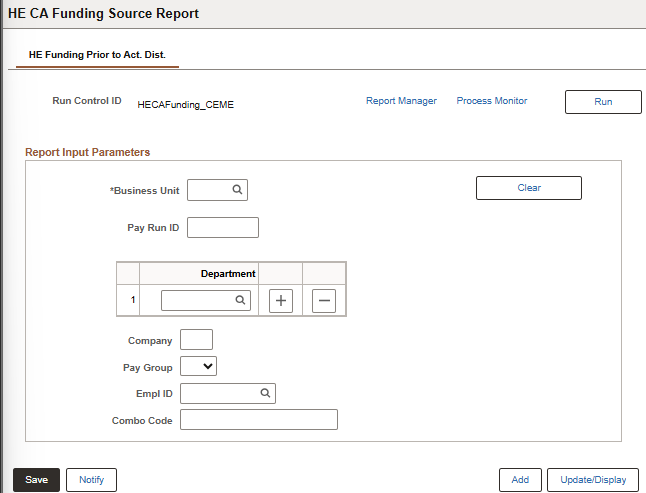
-
- *Business unit: UND01
- Pay Run ID: Automatically populates with the open pay cycle
- Department:
- Enter one or more department numbers;
- Row level security applies – if you do not have access to view data regarding a department, the report will not pull the information.
- Company: UND
- Automatically populates based on business unit
- Pay Group: Filter down to a specific pay group
- UNB – salary
- UNC – contract pay
- UNN – hourly
- Emplid: Filter down to a specific employee
- Row level security applies. If you do not have access to view data regarding a specific employee, the report will not pull the information.
- Combo Code: Filter down to a specific combo/funding code;
- Results will display all employees associated with that combo code even if an employee is not within row level security.
- Select “Run” in the top right corner.
- Select “OK”
- View the resulting report by selecting “Process Monitor”
Questions?
Contact Trish Muir or call 7.6973.